Aspire automates 44% of all correspondence with Kyber
Read More
Introducing In Product Training
Product Updates

Introducing In Product Training

Kyber now includes role based training inside the product, so every user can ramp quickly, stay consistent, and go live without the enterprise training tax.

Enterprise claims and communications platforms have a familiar playbook. The software is unintuitive, the learning curve is steep, and the vendor monetizes that friction through paid training and professional services. Training becomes a line item, sold separately from the core deal, and delivered outside the workflow through decks, recordings, and office hours that go stale.

Kyber is not built that way.

Kyber is designed to be easy to learn because it is built around claims workflows. And now, every Kyber user has in product training included at no additional cost. It is paired with direct Slack/Teams access to the Kyber team, so customers get both structured onboarding and fast answers when real world edge cases show up.

Why We Built In Product Training

Claims teams do not have time to learn tools in a classroom. They learn while the work is moving.

When enterprise platforms are hard to use, adoption becomes a change management project. Teams spend weeks teaching navigation, explaining where things live, and translating product concepts into claims reality. Then it repeats every time you hire, expand into new workflows, or roll out changes. The cost is not just money. It is time to confidence.

Adjusters hesitate because they are not sure what the correct path is. Reviewers see inconsistent drafts because users learned different habits. Admins become bottlenecks because they are the only ones who understand configuration. Leaders take longer to realize value because the team is still ramping.

We built in product training to remove that friction. Training should be part of using the product, not a separate project that you buy.

What In Product Training Is

In product training is a learning hub inside Kyber that helps users learn Kyber while they are using Kyber. Instead of hunting through documentation or waiting for scheduled sessions, users can move through short lessons that map to the way claims teams actually work.

The experience is structured and guided. Users can see where to start, what comes next, and what they have already completed. Quick knowledge checks reinforce key concepts, especially around navigation and the core actions that cause the most avoidable back and forth during onboarding.

It is also role based. Everyone gets the core learning path. Admins see additional optional modules that go deeper on admin responsibilities, including templates and configuration. That matters because admin knowledge is often where enterprise platforms create the most dependency. When only one person understands how templates are governed, every change becomes a bottleneck.

How It Works in Practice

Access: Users open Settings, then select Training.

Structured modules: Lessons are broken into short videos and grouped by the way teams actually onboard, including the foundational steps that cause the most friction in enterprise tools.
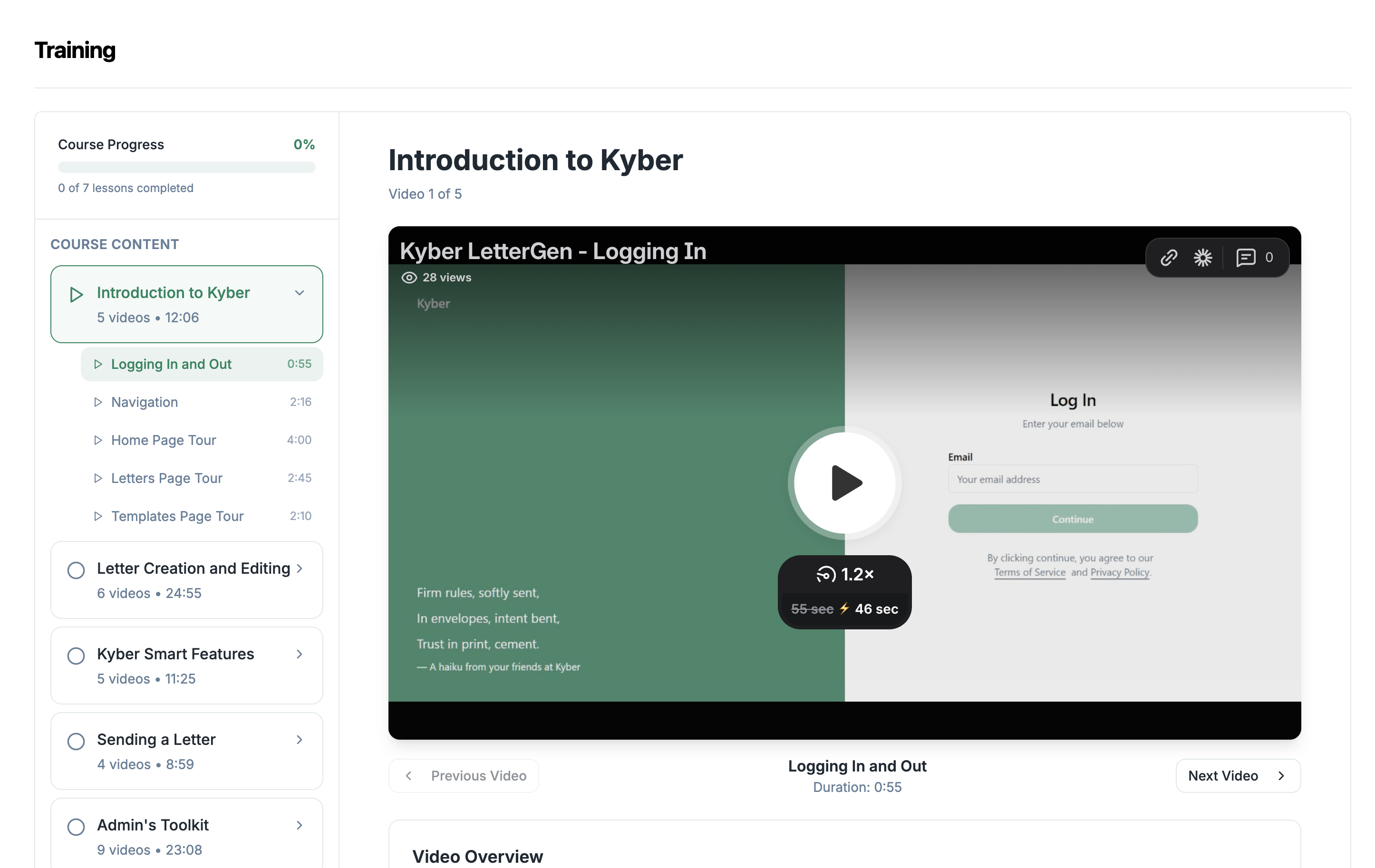
Progress tracking: Users can see what is complete and what comes next, so managers do not need to build a separate checklist to track onboarding.

Role based: Kyber shows optional modules based on user role. Admins see additional training that goes deeper on how Kyber is governed and managed, including templates.

Knowledge checks: Light quizzes reinforce key navigation and core actions. The intent is not testing. It is reducing the avoidable “where do I go for this” loop that slows teams down.

Why This Matters for Go Lives

Fast go lives are not only about technical integration. They are about whether the team can adopt the workflow quickly, consistently, and with minimal change management overhead.

That is why this training platform is tied directly to Kyber’s implementation experience. Customers go live quickly because onboarding is not treated as a separate program, and adoption is not gated by paid training sessions or internal champions translating a complex tool.

This also pairs naturally with other rollout accelerators. For example, when teams are migrating correspondence, Kyber’s AI Template Import Tool reduces the rebuild burden so you are not starting from scratch. In product training then helps the team ramp on the new workflows in a structured way, so adoption keeps pace with the technical rollout.

The result is an average of 90 days from kickoff to go-live.

Contents

No H2 Found

Thank you for subscribing!
From now on you will receive our monthly newsletter to your inbox.
Oops! Something went wrong while submitting the form.

Download Now

Thank you! Your submission has been received!
Oops! Something went wrong while submitting the form.
Free Whitepaper

Introducing In Product Training

Enterprise claims and communications platforms have a familiar playbook. The software is unintuitive, the learning curve is steep, and the vendor monetizes that friction through paid training and professional services. Training becomes a line item, sold separately from the core deal, and delivered outside the workflow through decks, recordings, and office hours that go stale.

Kyber is not built that way.

Kyber is designed to be easy to learn because it is built around claims workflows. And now, every Kyber user has in product training included at no additional cost. It is paired with direct Slack/Teams access to the Kyber team, so customers get both structured onboarding and fast answers when real world edge cases show up.

Why We Built In Product Training

Claims teams do not have time to learn tools in a classroom. They learn while the work is moving.

When enterprise platforms are hard to use, adoption becomes a change management project. Teams spend weeks teaching navigation, explaining where things live, and translating product concepts into claims reality. Then it repeats every time you hire, expand into new workflows, or roll out changes. The cost is not just money. It is time to confidence.

Adjusters hesitate because they are not sure what the correct path is. Reviewers see inconsistent drafts because users learned different habits. Admins become bottlenecks because they are the only ones who understand configuration. Leaders take longer to realize value because the team is still ramping.

We built in product training to remove that friction. Training should be part of using the product, not a separate project that you buy.

What In Product Training Is

In product training is a learning hub inside Kyber that helps users learn Kyber while they are using Kyber. Instead of hunting through documentation or waiting for scheduled sessions, users can move through short lessons that map to the way claims teams actually work.

The experience is structured and guided. Users can see where to start, what comes next, and what they have already completed. Quick knowledge checks reinforce key concepts, especially around navigation and the core actions that cause the most avoidable back and forth during onboarding.

It is also role based. Everyone gets the core learning path. Admins see additional optional modules that go deeper on admin responsibilities, including templates and configuration. That matters because admin knowledge is often where enterprise platforms create the most dependency. When only one person understands how templates are governed, every change becomes a bottleneck.

How It Works in Practice

Access: Users open Settings, then select Training.

Structured modules: Lessons are broken into short videos and grouped by the way teams actually onboard, including the foundational steps that cause the most friction in enterprise tools.

Progress tracking: Users can see what is complete and what comes next, so managers do not need to build a separate checklist to track onboarding.

Role based: Kyber shows optional modules based on user role. Admins see additional training that goes deeper on how Kyber is governed and managed, including templates.

Knowledge checks: Light quizzes reinforce key navigation and core actions. The intent is not testing. It is reducing the avoidable “where do I go for this” loop that slows teams down.

Why This Matters for Go Lives

Fast go lives are not only about technical integration. They are about whether the team can adopt the workflow quickly, consistently, and with minimal change management overhead.

That is why this training platform is tied directly to Kyber’s implementation experience. Customers go live quickly because onboarding is not treated as a separate program, and adoption is not gated by paid training sessions or internal champions translating a complex tool.

This also pairs naturally with other rollout accelerators. For example, when teams are migrating correspondence, Kyber’s AI Template Import Tool reduces the rebuild burden so you are not starting from scratch. In product training then helps the team ramp on the new workflows in a structured way, so adoption keeps pace with the technical rollout.

The result is an average of 90 days from kickoff to go-live.

Showcasing if a notice is approved or pending or denied.

Ready to Modernize Your Claims Process?

We'd love to share more about how Kyber helps claims teams automate so adjusters can focus on policyholders, not admin.

Book Demo
Showcasing if a notice is approved or pending or denied.

Frequently Asked Questions

How is Kyber different from traditional CCMs?

Kyber isn’t just a template library. It uses AI to pull the right policy language, apply jurisdictional rules, and generate accurate notices automatically. Every draft includes a built-in audit trail for full compliance visibility. Unlike legacy CCMs, Kyber is also lightweight to implement and easy to maintain across your claims team.

How does Kyber ensure compliance?

Kyber applies pre-approved templates, inserts only validated policy language, and enforces jurisdictional requirements for every letter. All edits, approvals, and versions are tracked automatically. All your organization's documents are audit-ready by default.

Does Kyber integrate with my existing Claims System?

Yes. Kyber is customizable to your organization’s existing tech stack (including core systems) and processes

How much time does it take to implement Kyber?

Most teams are live within a quarter when integrating with an existing claims system. For new integrations or more complex environments, implementation typically takes up to four months with full support from our onboarding team.

How does Kyber protect my organization’s data?

Kyber supports on-premise and private cloud deployments, and meets SOC 2 Type II compliance standards. You can choose the architecture that aligns with your internal security protocols while maintaining full control over sensitive claims and policy data.