See how Kyber connects with Guidewire Claim Center
View Accelerator
Introducing Kyber MCP: Now in Claude and Microsoft 365 Copilot
Product Updates

Introducing Kyber MCP: Now in Claude and Microsoft 365 Copilot

Kyber's MCP connector is now available through Claude and Microsoft 365 Copilot, enabling insurance teams to access templates, generate drafts, and create correspondence documents using natural language.

Published on
November 12, 2026

As AI assistants become part of everyday workflows,we're making it easier for P&C carriers to access Kyber's correspondence capabilities through the tools they already use.

Today, we're introducing Kyber's Model Context Protocol (MCP) connector, available through Claude and Microsoft 365 Copilot.

With Kyber MCP, insurers can find approved templates, generate correspondence drafts, and create documents in Kyber simply by asking their AI assistant.

How Does Kyber MCP Work?

Model Context Protocol (MCP) is an open standard that allows AI assistants to connect with other software to access information and perform tasks.

Kyber MCP connects supported AI assistants with Kyber's platform, allowing insurance teams to initiate correspondence tasks using everyday language.

For example, an adjuster can ask their AI assistant to find a reservation of rights template, identify the required information, and prepare a draft letter.

The resulting document can then be opened in Kyber for editing, review, approval, and delivery through the insurer's established workflows.

What Can Insurance Teams Do with Kyber MCP?

Kyber MCP enables insurance teams to access approved templates, identify required information, generate correspondence drafts, and retrieve documents through supported AI assistants.

These capabilities can support a range of correspondence needs, from claims notices and policyholder communications to other operational and regulatory correspondence.

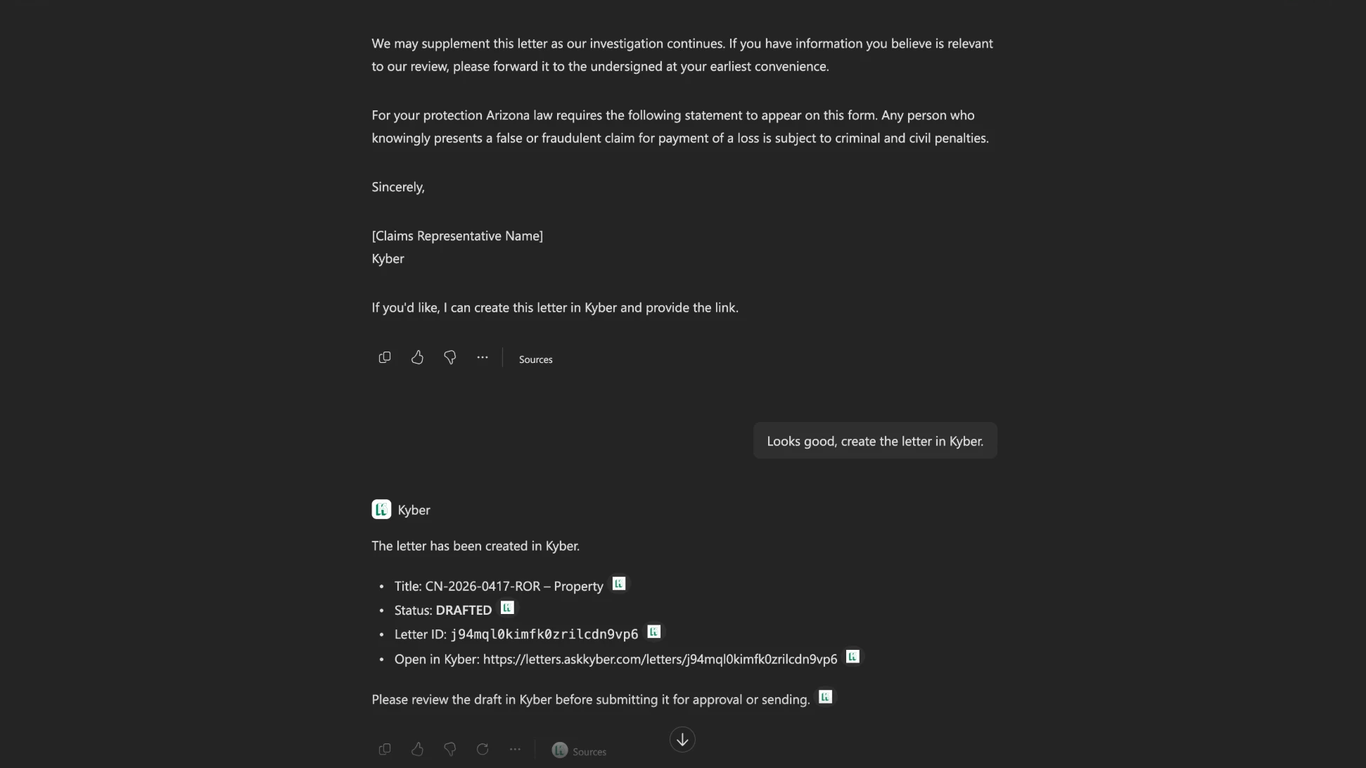
Here's one example of how Kyber MCP works in practice, using a reservation of rights letter in Claude.

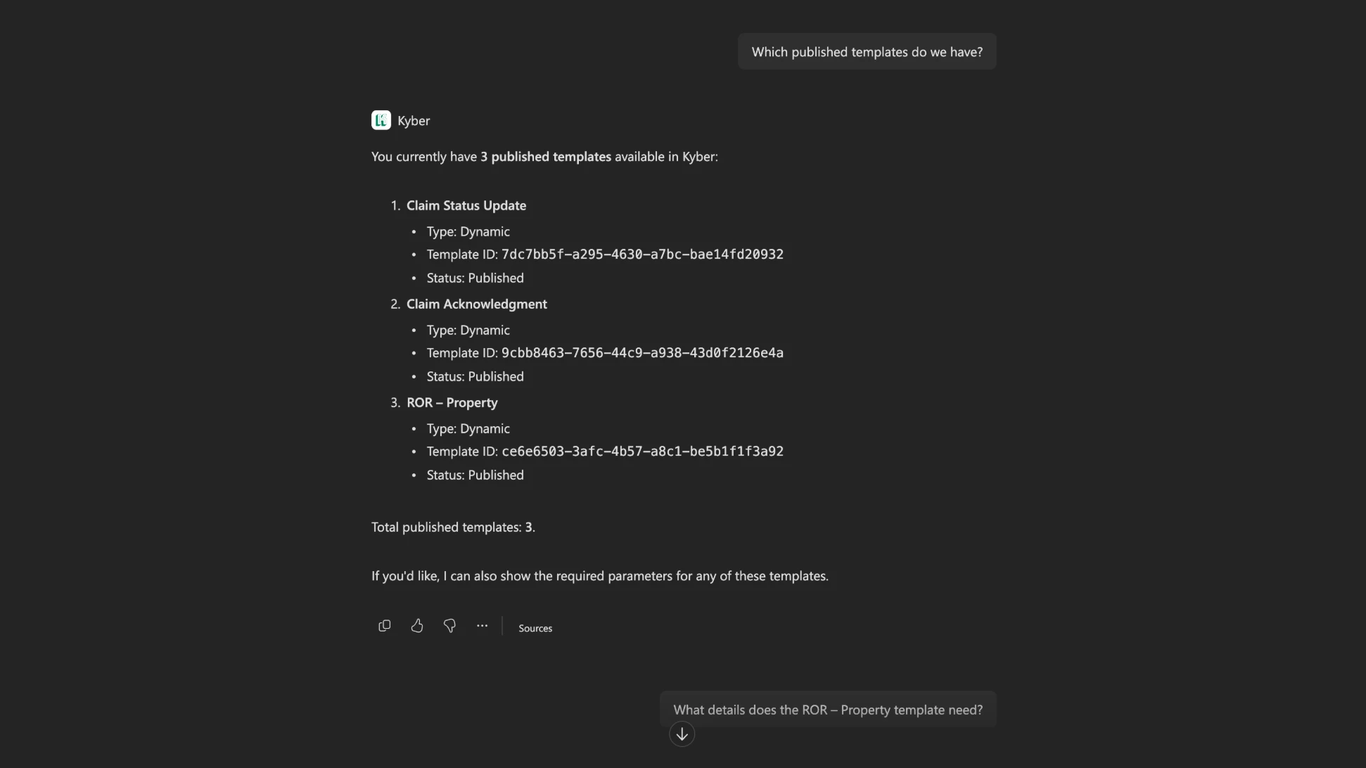
1. Find approved correspondence templates

Ask your AI assistant which published templates are available in Kyber, such as claim acknowledgments, status updates, or reservation of rights letters.
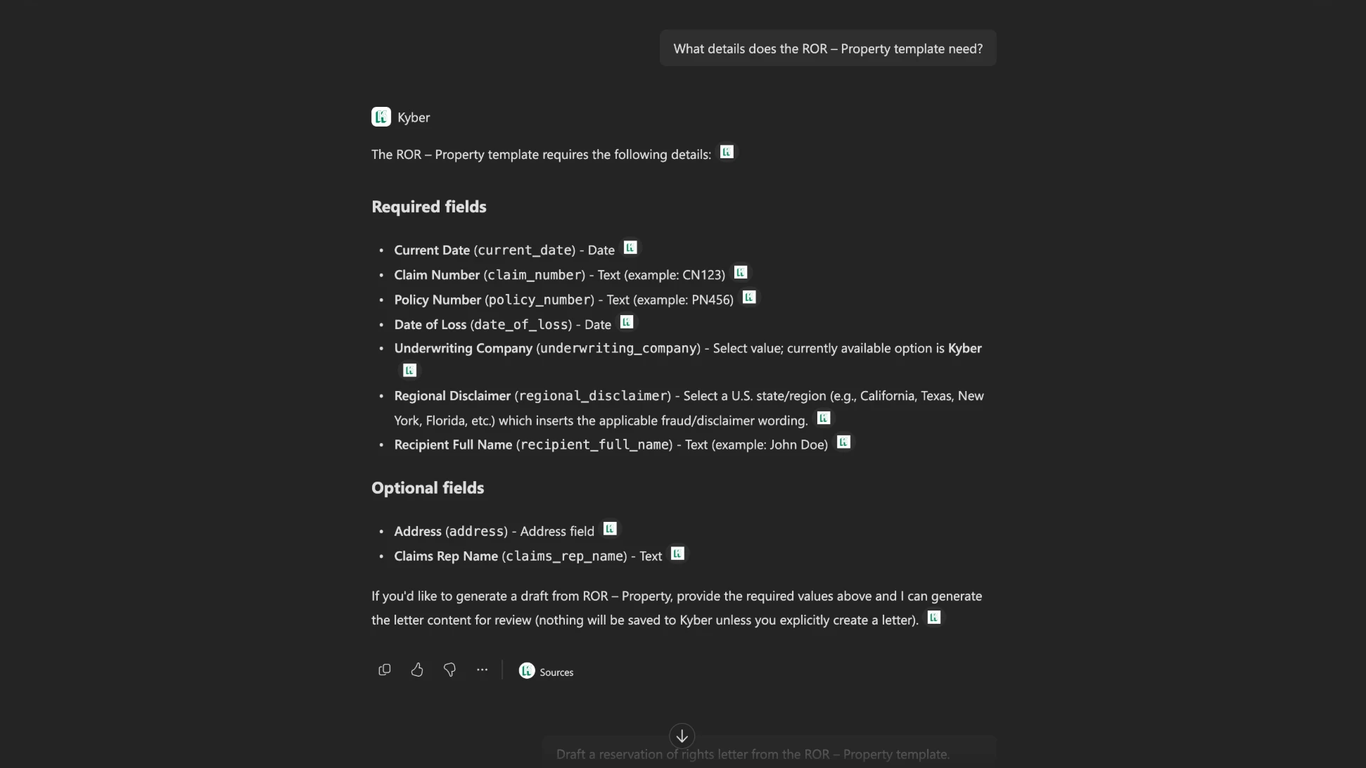
2. Identify the information needed

Select a template and ask which details are required to generate the letter. Kyber returns the relevant fields, including claim number, policy information, recipient details, and applicable state-specific language.
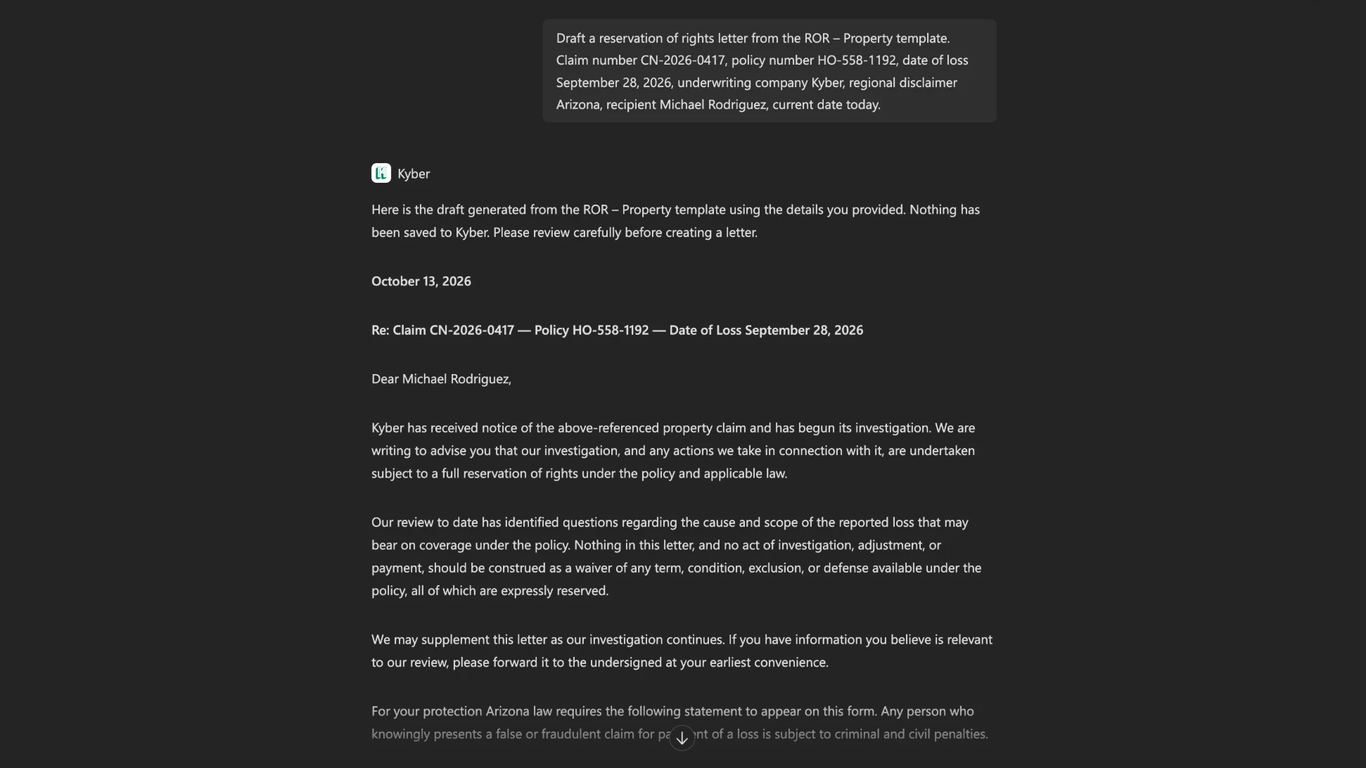
3. Generate a correspondence draft

Provide the required information and ask your AI assistant to prepare the letter using the selected template. Review the generated content directly in the conversation.
4. Create the document in Kyber

Once the draft is ready, ask your AI assistant to create the letter in Kyber. You'll receive a link to open the document, where it can be edited, reviewed, and submitted for approval.
What Does This Mean for P&C Insurers?

Kyber MCP gives insurance teams another way to work with correspondence without changing how documents are governed.

  • Easier access to approved content: Find and use published correspondence templates directly through supported AI assistants.
  • Less manual work: Identify required information and prepare drafts without navigating through multiple screens.
  • Existing controls remain in place: Continue managing document editing, review, approvals, and delivery within Kyber.

For insurers adopting AI across their organizations, MCP makes correspondence capabilities accessible within broader AI workflows while preserving established processes and controls.

How to get started

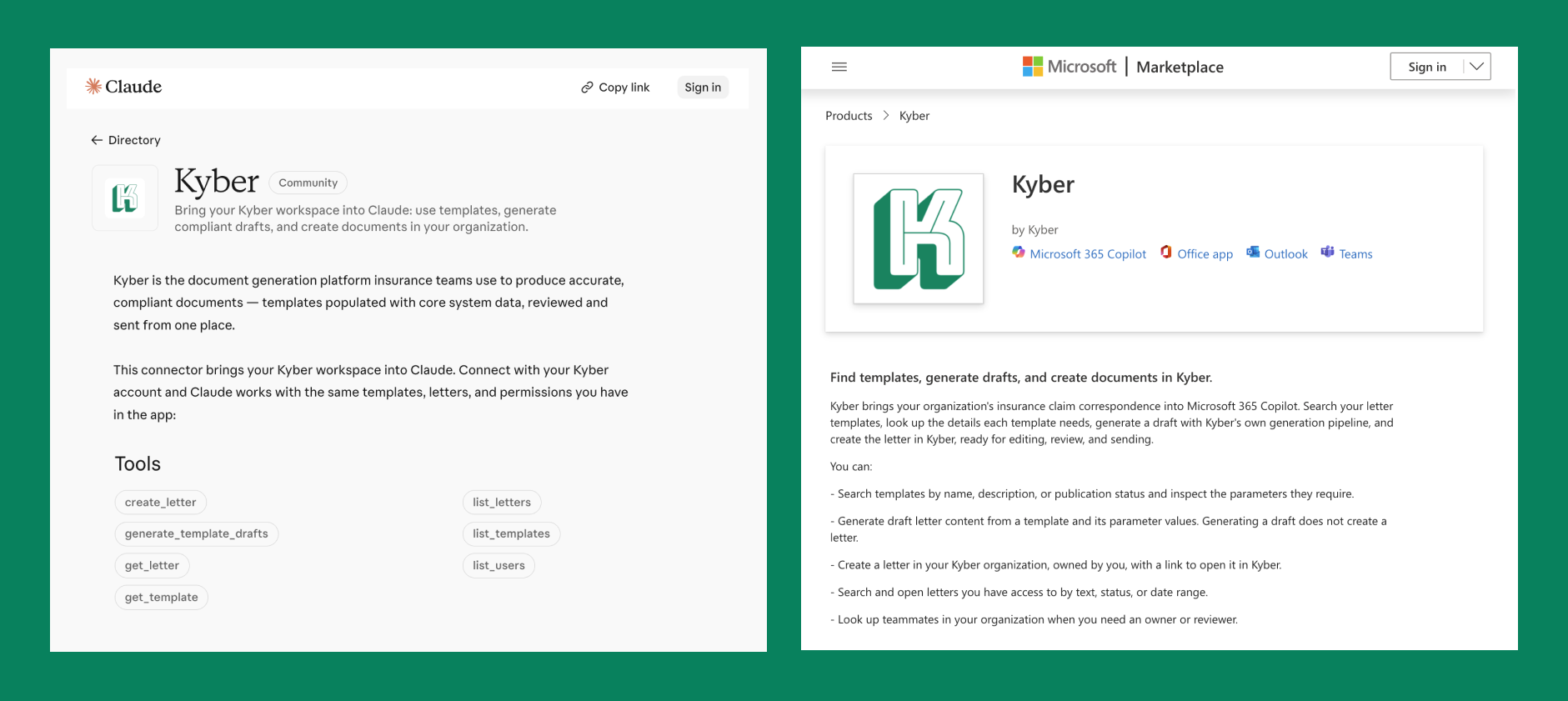
Kyber MCP is available through Claude and Microsoft 365 Copilot.

Users can find Kyber in their supported AI assistant's connector directory, connect their Kyber account, and start by asking which correspondence templates are available.
About Kyber

Kyber is an AI-native correspondence management platform built for P&C insurers. By connecting insurance data, document generation, template management, and correspondence workflows, Kyber helps insurers automate communications, reduce manual work, and maintain greater control across the correspondence lifecycle.

Learn more at www.askkyber.com.

Contents

Thank you for subscribing!
From now on you will receive our monthly newsletter to your inbox.
Oops! Something went wrong while submitting the form.

Download Now

Thank you! Your submission has been received!
Oops! Something went wrong while submitting the form.
Free Whitepaper

Introducing Kyber MCP: Now in Claude and Microsoft 365 Copilot

As AI assistants become part of everyday workflows,we're making it easier for P&C carriers to access Kyber's correspondence capabilities through the tools they already use.

Today, we're introducing Kyber's Model Context Protocol (MCP) connector, available through Claude and Microsoft 365 Copilot.

With Kyber MCP, insurers can find approved templates, generate correspondence drafts, and create documents in Kyber simply by asking their AI assistant.

How Does Kyber MCP Work?

Model Context Protocol (MCP) is an open standard that allows AI assistants to connect with other software to access information and perform tasks.

Kyber MCP connects supported AI assistants with Kyber's platform, allowing insurance teams to initiate correspondence tasks using everyday language.

For example, an adjuster can ask their AI assistant to find a reservation of rights template, identify the required information, and prepare a draft letter.

The resulting document can then be opened in Kyber for editing, review, approval, and delivery through the insurer's established workflows.

What Can Insurance Teams Do with Kyber MCP?

Kyber MCP enables insurance teams to access approved templates, identify required information, generate correspondence drafts, and retrieve documents through supported AI assistants.

These capabilities can support a range of correspondence needs, from claims notices and policyholder communications to other operational and regulatory correspondence.

Here's one example of how Kyber MCP works in practice, using a reservation of rights letter in Claude.

1. Find approved correspondence templates

Ask your AI assistant which published templates are available in Kyber, such as claim acknowledgments, status updates, or reservation of rights letters.

2. Identify the information needed

Select a template and ask which details are required to generate the letter. Kyber returns the relevant fields, including claim number, policy information, recipient details, and applicable state-specific language.

3. Generate a correspondence draft

Provide the required information and ask your AI assistant to prepare the letter using the selected template. Review the generated content directly in the conversation.

4. Create the document in Kyber

Once the draft is ready, ask your AI assistant to create the letter in Kyber. You'll receive a link to open the document, where it can be edited, reviewed, and submitted for approval.

What Does This Mean for P&C Insurers?

Kyber MCP gives insurance teams another way to work with correspondence without changing how documents are governed.

  • Easier access to approved content: Find and use published correspondence templates directly through supported AI assistants.
  • Less manual work: Identify required information and prepare drafts without navigating through multiple screens.
  • Existing controls remain in place: Continue managing document editing, review, approvals, and delivery within Kyber.

For insurers adopting AI across their organizations, MCP makes correspondence capabilities accessible within broader AI workflows while preserving established processes and controls.

How to get started

Kyber MCP is available through Claude and Microsoft 365 Copilot.

Users can find Kyber in their supported AI assistant's connector directory, connect their Kyber account, and start by asking which correspondence templates are available.

About Kyber

Kyber is an AI-native correspondence management platform built for P&C insurers. By connecting insurance data, document generation, template management, and correspondence workflows, Kyber helps insurers automate communications, reduce manual work, and maintain greater control across the correspondence lifecycle.

Learn more at www.askkyber.com.

Showcasing if a notice is approved or pending or denied.

Ready to Modernize Your Claims Process?

We'd love to share more about how Kyber helps claims teams automate so adjusters can focus on policyholders, not admin.

Book Demo
Showcasing if a notice is approved or pending or denied.

Frequently Asked Questions

How is Kyber different from traditional CCMs?

Kyber isn’t just a template library. It uses AI to pull the right policy language, apply jurisdictional rules, and generate accurate notices automatically. Every draft includes a built-in audit trail for full compliance visibility. Unlike legacy CCMs, Kyber is also lightweight to implement and easy to maintain across your claims team.

How does Kyber ensure compliance?

Kyber applies pre-approved templates, inserts only validated policy language, and enforces jurisdictional requirements for every letter. All edits, approvals, and versions are tracked automatically. All your organization's documents are audit-ready by default.

Does Kyber integrate with my existing Claims System?

Yes. Kyber is customizable to your organization’s existing tech stack (including core systems) and processes

How much time does it take to implement Kyber?

Most teams are live within a quarter when integrating with an existing claims system. For new integrations or more complex environments, implementation typically takes up to four months with full support from our onboarding team.

How does Kyber protect my organization’s data?

Kyber supports on-premise and private cloud deployments, and meets SOC 2 Type II compliance standards. You can choose the architecture that aligns with your internal security protocols while maintaining full control over sensitive claims and policy data.